SASSA Status Check
To do a SASSA status check for the SRD R370 grant, open the official status page at srd.sassa.gov.za, type your 13-digit ID number and the cellphone number you used when you applied, then press submit. You will see a result for each month: Approved, Pending or Declined. Once a month is approved, a pay date shows next to it.
Every month, millions of people type in the same two details and hope to see one word: Approved. Sassa status check is the fastest way to find out if your R370 is coming this month, what day it will land, and what to do if the answer is not the one you wanted. This SASSA SRD status check guide covers the whole process for the 2026/27 year. It shows you the official ways to check, the full Payment dates schedule, what each status message means, and the steps to take when your application was declined.
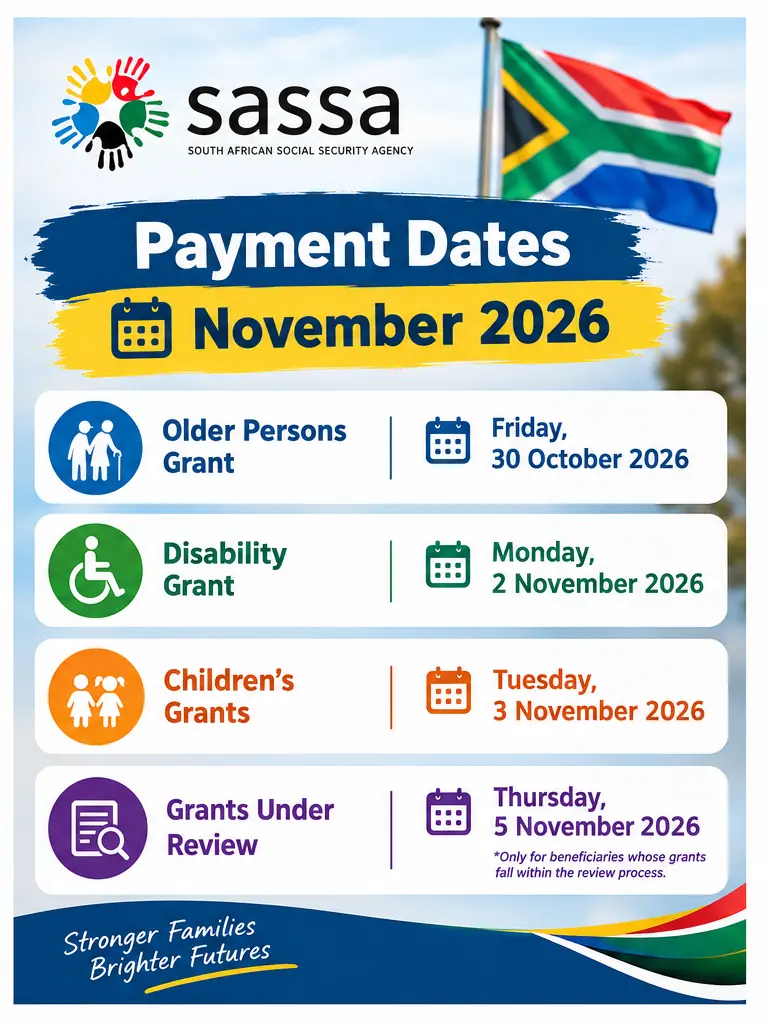
SASSA November 2026 Payment Dates
SASSA moved the November payments earlier because Wednesday 4 November was Local Government Election day. No grants were paid on election day.
How to Check Your SRD Status Online
- Open srd.sassa.gov.za on your phone or computer. Check that the address ends in .gov.za.
- Tap the option to check your application status. You can also go straight to srd.sassa.gov.za/sc19/status.
- Type your 13-digit South African ID number.
- Type the 10-digit cellphone number you used when you applied. A new number will not work unless you already changed it with SASSA.
- Press submit.
- Find the month you want. Read the outcome and any reason written next to it.
The top part of the result often says “Application complete”. This only means your form went through. It does not mean you are approved. The month by month results below it are the part that matters.
If the page says “too many requests” or keeps loading, wait and try again later. The site is busiest in the last ten days of the month, when millions of people are waiting for SRD money and refreshing at the same time. Early morning is usually quicker.
Asylum seekers and special permit holders: start from the SRD homepage and choose the option for your document type. The ID form above is for South African ID holders.
How to Check Your SASSA SRD Status: Website, WhatsApp, Phone and USSD
The SRD website is the best place to check your status, because it shows every month and the reason for any decline. If the website will not open or you have no data, use WhatsApp, the call centre or a SASSA office instead.
Every option asks for the same two details, so have them ready before you start:
- 13-digit ID number
- The cellphone number you applied with
- That SIM in your phone, for the OTP
Which option should you use?
| Option | What you need | Cost | Good for |
|---|---|---|---|
| SRD website | ID number, cellphone number, data | Your data only | Full monthly results and decline reasons |
| WhatsApp 082 046 8553 | WhatsApp on the phone you applied with | Small amount of data | Quick check when the website is slow |
| Call centre 0800 60 10 11 | ID number, cellphone number | Free call | Asking someone to explain a decline |
| SASSA office | ID book or Smart ID card | Taxi fare | Lost SIM, lost ID, identity problems |
- Open srd.sassa.gov.za on your phone or computer. Check that the address ends in .gov.za.
- Tap the option to check your application status, or go straight to the status page above.
- Type your 13-digit South African ID number.
- Type the 10-digit cellphone number you used when you applied. A new number will not work unless you already changed it with SASSA.
- Press submit.
- Find the month you want. Read the outcome and any reason written next to it.
How to read your result
- “Application complete” is not an approval. It only means your form went through. The month by month results below it are the part that matters.
- Check the month first. SASSA checks every month on its own, so you can be approved in October and declined in November.
- Declined? The reason is written next to that month, for example “Alternative income source identified”.
- Payment field says “Not Selected”? If you also have no bank account on file, there is no cash waiting for you. Choose a payment method on the SRD website.
If the page says “too many requests” or keeps loading, wait and try again later. The site is busiest in the last ten days of the month, when millions of people are waiting for SRD money and refreshing at the same time. Early morning is usually quicker.
Asylum seekers and special permit holders: start from the SRD homepage and choose the option for your document type. The ID form is for South African ID holders.
Check My SRD StatusThe Western Cape Department of Social Development lists this number as the SRD WhatsApp line in its July 2026 SASSA contact details. Save it as +27 82 046 8553, or open the WhatsApp chat straight away.
How to use it
- Open WhatsApp on the phone with the SIM you applied with.
- Start a chat with 082 046 8553 and send Hi.
- Choose the SRD option from the menu.
- Follow the steps it gives you. It may ask for your ID number and a one time PIN (OTP).
- Pick the status option and read the result for your month.
About the OTP: the code comes by SMS to your registered number. Type it only into the WhatsApp chat you started. Never send it to a person who offers to “check for you”.
Other “SASSA WhatsApp numbers” go around on Facebook and in WhatsApp groups, but we only list the one a government page shows.
The call is free. This is the best option when you want a person to explain a decline reason or tell you what to do next.
Have these ready before you call
- Your 13-digit ID number.
- The cellphone number you applied with.
- The month you are asking about.
- The exact words your status shows.
Ask for a reference number before you hang up and write it down. If you were declined, ask the agent to explain the reason and how to appeal that month.
Older government guides list *134*7737# for the SRD grant. You dial it like a normal number and it works without data.
Many people now get “Service code not supported” when they dial it. That message is about the code, not your grant. It does not mean you were declined.
If the code does not work, use WhatsApp 082 046 8553 or call 0800 60 10 11 for free.
Old articles and forwarded messages still tell people to check SRD on GovChat at 060 012 3456. This number now belongs to the Department of Health’s information line and has no SRD option, so skip it.
If a message or website still sends you to GovChat for your SRD status, it is out of date. Do not type your ID number there.
Use the SRD website, WhatsApp 082 046 8553 or the call centre on 0800 60 10 11 instead.
Go only if the other options cannot help. The office is the right place when your SIM card is lost or stolen, your ID is lost, or your identity check keeps failing. Every other option needs your registered number to work.
Call first
Phone 0800 60 10 11 before you travel. Ask for the nearest office, its opening hours and what to bring for your problem, so you don’t waste taxi fare on a second trip.
What to take with you
- Your green ID book or Smart ID card.
- A copy of your ID.
- Your old and new cellphone numbers, and the SIM if you still have it.
- A bank confirmation letter, if your problem is about your bank account.
- Any SMS from SASSA about your application.
If your ID is lost, say so when you call and ask which other documents they accept. Some offices also ask for proof of address.
We only list numbers that appear on a government page. SASSA never charges a fee and never asks for your card PIN. Type an OTP only into the SASSA service you started yourself.
SASSA Grant Amounts for 2026/27
These are the monthly amounts for every SASSA grant in the 2026/27 year. Treasury announced them in the February 2026 Budget, and SASSA has paid them since April 2026. You do not need to apply again to get the new amount. It is added to your grant on its own.
| Grant | Who it is for | Monthly amount | Up by |
|---|---|---|---|
| Older persons grant (60 to 74) | People aged 60 to 74 | R2,400 | +R85 |
| Older persons grant (75 and older) | People aged 75 and older | R2,420 | +R85 |
| Disability grant | Adults aged 18 to 59 who cannot work because of a disability | R2,400 | +R85 |
| Care dependency grant | Parents or carers of a child under 18 with a severe disability who needs full time care | R2,400 | +R85 |
| War veterans grant | People who fought in the Second World War or the Korean War | R2,420 | +R85 |
| Foster child grant | Foster parents of a child placed with them by a court | R1,295 | +R45 |
| Child support grant | The main carer of a child under 18, paid for each child | R580 | +R20 |
| Grant in aid | People on an older persons, disability or war veterans grant who need someone to care for them full time | R580 | +R20 |
| SRD grant | Unemployed people aged 18 to 60 with no income or less than R624 a month | R370 | No change |
SRD stays at R370. The SRD grant did not go up in the 2026 Budget. In October 2026, Treasury said it will keep paying the grant for another year while government plans a replacement.
Seeing R1,290 for the foster child grant on other sites? The 2026 Budget figure published by SAnews is R1,295. If your foster grant payment looks wrong, call SASSA on 0800 60 10 11.
Source: SAnews, “Social grants to increase”, 25 February 2026. Amounts are per month, per person (child support and foster grants are per child).
SASSA Payment Dates for 2026/27
SASSA pays the main grants over three days at the start of each month, always in the same order. The SRD grant is paid separately in batches near the end of the month, so it has no fixed date in this table.
- Day 1Older persons
- Day 2Disability
- Day 3Children’s grants
- Month endSRD R370
| Month | Older persons | Disability | Children’s grants | SRD R370 |
|---|---|---|---|---|
| December 2026 Next | Wed 2 Dec | Thu 3 Dec | Fri 4 Dec | Check your status |
| January 2027 | Tue 5 Jan | Wed 6 Jan | Thu 7 Jan | Check your status |
| February 2027 | Tue 2 Feb | Wed 3 Feb | Thu 4 Feb | Check your status |
| March 2027 | Tue 2 Mar | Wed 3 Mar | Thu 4 Mar | Check your status |
Which day is my grant? Foster child and care dependency grants are paid on the children’s grants day. Grant in aid is an extra amount added to an older persons, disability or war veterans grant, so it comes on the same day as that grant.
SRD R370: each person gets their own SRD pay date, and it only shows on the SRD status page once that month is approved. Most SRD batches go out in the last week of the month, so start checking from about the 20th.
Dates can still move. SASSA moved the November 2026 dates earlier because of the local elections. If SASSA changes a date again, we update this table.
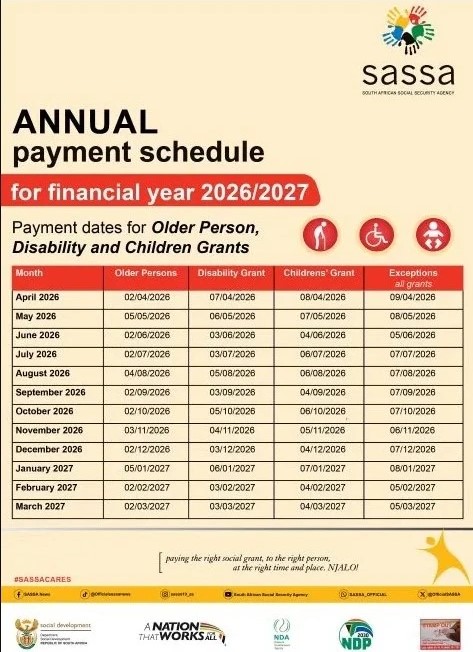
SASSA Payment Schedule 2026/2027: Older Persons, Disability and Children’s Grants
Old Age, Disability or Child Grant Not Paid?
These grants do not need a new application every month, so a missing payment usually has a simple cause. Work through these checks before you travel to an office.
Check these in order
- Right day? Older persons are paid first, then disability, then children’s grants. Check the date for your grant type in the table above.
- Has it been two working days? Bank payments can take one to two working days to show. Wait that long before you worry.
- Check your balance the right way. Use your bank’s app, an ATM or the till at a shop. The SASSA website cannot see your balance.
- Still using a gold card? Gold cards stopped working on 31 August 2026. Your money is safe in your Postbank account, but you need the free Postbank black card to draw it.
- Did SASSA send you a review letter or SMS? If your grant is under review, it is paid on a later day. Do what the letter asks.
- Still nothing? Call SASSA on 0800 60 10 11, say which month is missing, and ask for a reference number.
On a review list? You get a later pay day
SASSA sets aside a fourth pay day each month for grants under review. In November 2026 it was Thursday 5 November. If you are on a review, answer SASSA’s letters and go to your review appointment, or your grant can be stopped.
You don’t have to draw your money on pay day
Once the money is in your account, it stays there until you take it out. There is no need to queue at the ATM on the first morning. Queues are usually much shorter a few days later.
Don’t leave it for three months. If you don’t draw your grant for three months in a row, SASSA can stop it. Draw at least some money each month, even if it is a small amount.
Waiting for the SRD R370? The SRD works differently. Read the “Approved but the money is not in” section on this page, or check your result on the SRD status page.
What Does the Fourth Payment Day Mean?
What Your SRD Status Means
SASSA checks every month on its own, using bank, UIF, NSFAS and Home Affairs records. That is why you can be approved in October and declined in November without anything changing on your side. Find the words on your status page below and see what to do next.
At a glance
| Status | What it means | What to do |
|---|---|---|
| Pending | Not checked yet | Wait and check again |
| Approved | You qualify this month | Wait for a pay date |
| Declined | You did not qualify this month | Read the reason, appeal if wrong |
| Referred | Extra check needed | Wait for SASSA |
| Bank details pending | Bank account not confirmed | Fix only if wrong |
| Identity verification failed | Details don’t match Home Affairs | Check details, verify again |
| Self exclusion response found | Your answers say you don’t qualify | Fix answers if wrong |
| Reapplication pending | SASSA needs your action | Log in and finish the steps |
| Application not found | No match for your details | Check ID and phone number |
| Cancelled | Application closed | Reinstate if you qualify |
Each status explained
Pending
SASSA has not finished checking that month yet. This is normal early in the month.
Approved
You qualify for that month. The money is paid once a pay date shows next to the month.
Declined
You did not qualify for that month. The reason is written next to it. These are the most common reasons:
- Alternative income source identified: money above R624 went into your bank account that month. It can be a salary, a side job, or even a family member sending money.
- UIF registered: your ID shows on the UIF system, either as a worker or as someone getting UIF money.
- NSFAS registered: you are getting NSFAS student funding.
- Existing SASSA grant: you already get a grant for yourself, like the old age or disability grant. A child support grant you collect for a child does not count against you.
- Identity verification failed: your details do not match Home Affairs records. See the card below.
- Age outside range: the SRD grant is for people aged 18 to 60.
- DHA registered death: Home Affairs has a death recorded on your ID. You must fix this at Home Affairs before SASSA can help.
Referred
Your application needs an extra check before SASSA makes a decision.
Bank Details Pending
You are approved, but SASSA has not confirmed your bank account yet. The account must be in your own name for it to pass.
Identity Verification Failed
The details on your application do not match what Home Affairs has on record for your ID.
Self Exclusion Response Found
The answers you gave on your form say you do not qualify. For example, you said you have an income or get money from someone.
Reapplication Pending
Your application needs your action before SASSA can check it again.
Application Not Found
No SRD application matches the ID number and cellphone number you typed.
Cancelled
The application was closed, either by you or by SASSA.
Payment Field Says “Not Selected”
This field shows how you collect your money. If it says “Not Selected” and you have no bank account on file, there is no cash waiting for you.
Approved but the Money Is Not Received?
Check these in order. Most problems are found by step three.
- Right month? Make sure the approved month is the one you are waiting for. An approved September does not mean November is paid.
- Is there a pay date? No date means the payment has not been sent yet. Check again in the last week of the month.
- Has the date passed? Bank payments can take one to two working days to show. Check your balance at your bank, not on the SASSA site.
- Bank account problems. A closed or dormant account, or an account in someone else’s name, can stop the payment.
- Still nothing after a week? Call 0800 60 10 11 and ask SASSA to trace the payment. Write down the reference number.
Your money does not disappear if you don’t draw it on pay day. It stays in your account until you take it out. So there is no need to stand in the ATM queue on the first morning.
Who Can Get the R370 SRD Grant?
You may qualify if all of these apply to you:
- You are a South African citizen, permanent resident, refugee, asylum seeker or special permit holder living in South Africa.
- You are between 18 and 60 years old.
- You have no income, or less than R624 a month.
- You do not get any other social grant for yourself.
- You do not get UIF or NSFAS money.
- You do not live in a government funded place, such as a state shelter.
The R624 limit counts money coming into your bank account, not only a salary. This is why people get declined after a family member sends them money. A court case is challenging this limit (see below), but for now R624 still applies.
You do not need to apply again every month. SASSA checks you again each month on its own. Keep your details up to date and use the reconfirmation option if your situation changes.
Declined? How to Appeal a Month
You have the right to appeal, it costs nothing, and you don’t need a lawyer or an agent. If your appeal wins, you get paid for that month.
-
1
Go to the SRD Website and Open Appeals
Open srd.sassa.gov.za and choose the Appeals option. Check that the address ends in .gov.za before you type anything.
-
2
Enter Your ID Number and OTP
Type your 13-digit ID number and the cellphone number you applied with. SASSA sends a one time PIN (OTP) by SMS to that number. Type it in to carry on.
-
3
Pick the Declined Month and Say Why It Is Wrong
Choose the month you want SASSA to look at again. Explain in plain words why the decision is wrong, for example “the money in my account was a once off gift from my sister, not income”.
-
4
Submit and Save Your Confirmation
Press submit, then take a screenshot of the confirmation or write down the reference number. You can check how your appeal is going on the same SRD website.
Each declined month needs its own appeal. If July and August were both declined, that is two appeals. One bad month does not close your SRD file, and you can appeal one month without touching any other month.
Appeals are decided by the Independent Tribunal for Social Assistance Appeals (ITSAA), not by SASSA. A new application does not fix an old declined month. Only an appeal can do that.
lt.
Change Your Phone Number or Bank Details
Do both only on srd.sassa.gov.za. Never use a link sent by SMS or WhatsApp, and never let a stranger “update” your details for you.
Bank Details
The account must be in your own name. After you change it, SASSA checks the new account again, so your payment may wait a little. Only change it if the old details are wrong.
Phone Number
If you still have the old SIM, you can change your number on the SRD website using the OTP sent to the old number. If the old SIM is lost or stolen, the website cannot help, because every OTP goes to that number. Go to a SASSA office with your ID.
If you cannot get the OTP because the SIM is gone, the portal cannot help you. You will have to go to an office with your ID book. There is no way around this.
Is the R370 Grant Ending?
No, not right now. In the 2026 Budget, Treasury kept the SRD grant at R370 a month and funded it up to 31 March 2027. Then on 21 October 2026, the Medium Term Budget Policy Statement said the grant will stay for another year while government designs a replacement. The amount did not change.
The planned replacement is often called a Livelihood Grant or Basic Income Support. There is no start date, no amount and no registration for it yet. Any message asking you to “pre-register” or pay a fee for it is a scam.
There is also a court case. The Pretoria High Court found parts of the SRD rules invalid, including the R624 income limit, and government took that ruling to the Supreme Court of Appeal, which heard the case on 25 August 2026.
No judgment had come out by the time of this update. Until the court decides, the grant stays at R370 and the R624 limit stays.
Source: Official budget reporting.
Still Using a SASSA Gold Card?
Gold cards stopped working on 31 August 2026, and Postbank said there would be no extension. Your money is still safe in your Postbank account. You just need the new Postbank black card to draw it.
The swap is free. Take your ID to a Postbank point inside Shoprite, Checkers, Usave, Pick n Pay, Boxer or SPAR. Make sure the new card says “Postbank” on the front.
SASSA Scams to Watch Out For
- Fees: SASSA never charges you to check, apply, appeal or “release” a grant. Anyone asking for R25, R50 or any amount is lying.
- Your OTP: No real SASSA worker will ask for your OTP, your card PIN or your banking password.
- Fake grants: Posts about an R700 grant or “Livelihood Grant registration” are not real. Check news on sassa.gov.za or the SASSA Facebook page.
- Fake websites: The only SRD site is srd.sassa.gov.za. If the address does not end in .gov.za, it is not SASSA.
- Screenshots: Don’t post your status screenshot in Facebook groups without covering your ID number and phone number.
Report scams to SASSA on 0800 60 10 11.
SASSA Contact Details
Use these official SASSA numbers if you need help with your grant. Have your ID number and the cellphone number you applied with ready before you call.
Frequently Asked Questions
Frequently Asked Questions
Does approved mean the money is in my account?
No, approved only means you qualify for that month. The money is sent once a pay date shows next to the month. After that date, check your balance at your bank, because the SASSA website cannot see your account.
Can I check my SASSA status with only my ID number?
You need both your ID number and the cellphone number you applied with. Every official option asks for the two together, because the phone number is how SASSA knows the ID is really yours and not one someone found.
Is the SASSA status check free?
Yes. SASSA never charges you to check your status, apply or appeal. The website uses a little data, and the call centre on 0800 60 10 11 is free. Anyone who asks you for a fee is a scammer.
What if no result appears?
Check all 13 digits of your ID and use the same cellphone number you applied with. Asylum seekers and special permit holders must use the option for their own document. A missing result does not mean your application was cancelled. If it still shows nothing, call 0800 60 10 11.
Do I need to apply again every month?
No, SASSA checks your application again each month on its own. Just keep your phone number and bank details up to date. If a month is declined, appeal that month instead of starting a new application.
Can I get the SRD grant and a child support grant at the same time?
Yes. A child support grant is paid for the child in your care, so it does not count as a grant for yourself. If you are declined for “existing SASSA grant” only because of a child support grant, appeal that month.
Will checking more often speed up payment?
Checking only reads your result, it does not move you up the line. Once or twice a week is enough, plus a check in the last week of the month when most SRD pay dates appear.
Can I help someone else check their status?
Yes, if they say it’s okay and they are with you. Let them handle the OTP themselves, and don’t save their ID number or phone number on your phone.
I never applied, but my ID shows an SRD application. What now?
Someone may have used your ID. Call SASSA on 0800 60 10 11, email [email protected], and open a case at your nearest police station.
Can this website approve my grant?
No, we are an independent guide, not SASSA. We cannot see your application, approve a grant or release a payment. Only SASSA and the appeals tribunal (ITSAA) make those decisions.
turnitaround.co.za is an independent guide. We are not SASSA or the government, we cannot see your application, and we cannot approve or pay any grant. We check SASSA, SAnews and Treasury notices and update this page when dates or rules change and official website srd.sassa.gov.za,.
One thing we cannot do
We are not SASSA and we are not part of the South African Government. We cannot see your application, release a payment or lodge an appeal for you. For anything about your own grant, call SASSA free on 0800 60 10 11 or use the official portal.